
And what other B2B teams can learn from the playbook
We got 7 G2 reviews in Q1 2025.
That's not a typo. Seven. For a gifting platform competing across categories like Account-Based Direct Mail, Direct Mail Automation, and Rewards and Incentives, that number wasn’t just disappointing. It was a liability.
Fast forward to Q1 2026. We got 107 reviews. Same product. Same $20 incentive. Same basic ask.
We just stopped sending gift cards by switching to physical gifts instead.
This post breaks down exactly what we did, why it worked, and how other B2B teams can replicate it using Reachdesk.
It’s also a direct answer to a question we’re hearing more and more from our customers: “How can we run the same play?”.
Why G2 reviews matter more than ever
Most teams still think of G2 as a review site. A place buyers check before they sign a contract. That's not wrong, but it's incomplete.
G2 is now a training source for large language models (LLMs).
When a buyer opens ChatGPT, Perplexity, or any AI-powered search tool and types "best gifting platform" or "Reachdesk vs [competitor]," those answers are being pulled from somewhere. G2 is one of the primary sources.
In the last 60 days alone, Reachdesk generated 15,335 LLM citations. That's a 43% increase. We currently hold the number two citation rank in our category.
Here's the feedback loop that makes this matter:
Every 10% increase in reviews drives a 2 to 5% lift in LLM citations. More reviews means more visibility in AI-generated answers. More visibility means more buyers finding you before they've ever visited your website or talked to a rep.
At 125 new reviews per quarter, the math looks like this:
- Q1 2026: 1,000 reviews, 15,335 citations
- Q2 2026: 1,125 reviews, 16,871 citations
- Q3 2026: 1,250 reviews, 18,558 citations
- Q4 2026: 1,375 reviews, 20,414 citations
- Q1 2027: 1,500 reviews, 22,455 citations
That's 46% more LLM visibility in 12 months. No ad spend. No new content. Just review velocity.
We've crossed 1,000 total reviews on G2. We're featured in 109 reports. 38 of those reports improved this cycle, compared to just 3 in Q1 2025. And we're the only gifting and swag platform ranked High Performer in Account-Based Orchestration.
None of that happened by accident. And it didn't require a complicated multi-touch campaign. Instead, it came down to one small shift in how we approached customer reviews (and how we reworded them for their time!).
The problem with gift cards for encouraging customer reviews
Before we get into the playbook, it's worth understanding what wasn't working.
Gift cards are the default incentive for G2 review campaigns. They're easy to automate. Easy to redeem. That’s why they make perfect sense on paper.
The problem however, is that they often feel like a transaction.
You click a link, you leave a review, a $20 Amazon gift card lands in your inbox. Done. Forgettable. The experience is so frictionless that there's nothing memorable about it. No moment where the person on the other end thinks, "Huh, that was nice."
We found that people weren't saying no to leaving a review. They just weren't going out of their way to do it. The gift card offer is simply not compelling enough.
So we made a small change.
From gift cards to physical gifts: A strategic change that drives G2 reviews
Instead of sending a digital gift card after someone left a review, we offered a physical gift.
Same $20 value. But instead of a code, reviewers could choose something from a curated marketplace and have it shipped directly to their door.
That choice mattered. It made the experience feel more personal and more intentional. A few days later, something arrived at their home. Not an email. Not a digital reward. A physical product they selected themselves.
That small delay created anticipation. It turned a simple review incentive into an unforgettable experience.
Gift cards feel transactional. Physical gifts feel thoughtful.
When you combine a physical gift incentive with real, one-to-one outreach from a real person, response rates increase. It no longer feels like an automated request. It feels like a genuine exchange.
The results were clear. In Q1 2025, we generated 7 G2 reviews. In Q1 2026, we generated 107 reviews.
We did not expect that level of growth. Even internally, 107 reviews exceeded expectations.
How to get more G2 reviews in 4 Steps: The exact process we used
Here is the step-by-step G2 review strategy that helped us increase review volume and that other B2B teams can replicate using Reachdesk.
Step 1: Target active customers for G2 reviews
We did not send review requests to our entire customer base. Instead, we focused on active users who were already getting value from the platform.
These customers are more likely to:
- Leave a review quickly
- Write more detailed feedback
- Submit higher-quality reviews
This directly impacts your performance in G2 reports and rankings.
If you want to increase G2 reviews, start with customers who are already engaged. Asking inactive users to leave a review typically leads to low response rates and weaker content.
Step 2: Send a simple, personal G2 review request email
Most teams overcomplicate their outreach. We kept it simple.
No multi-step nurture sequences. No heavy personalization. No branded templates.
Just a plain text email from a real person, sent from a real email address.
Example:
"Hey [name], I would really appreciate it if you could leave us a quick review on G2. It takes about 5 minutes. As a thank you, I will send you a gift. Here is the link: [link]"
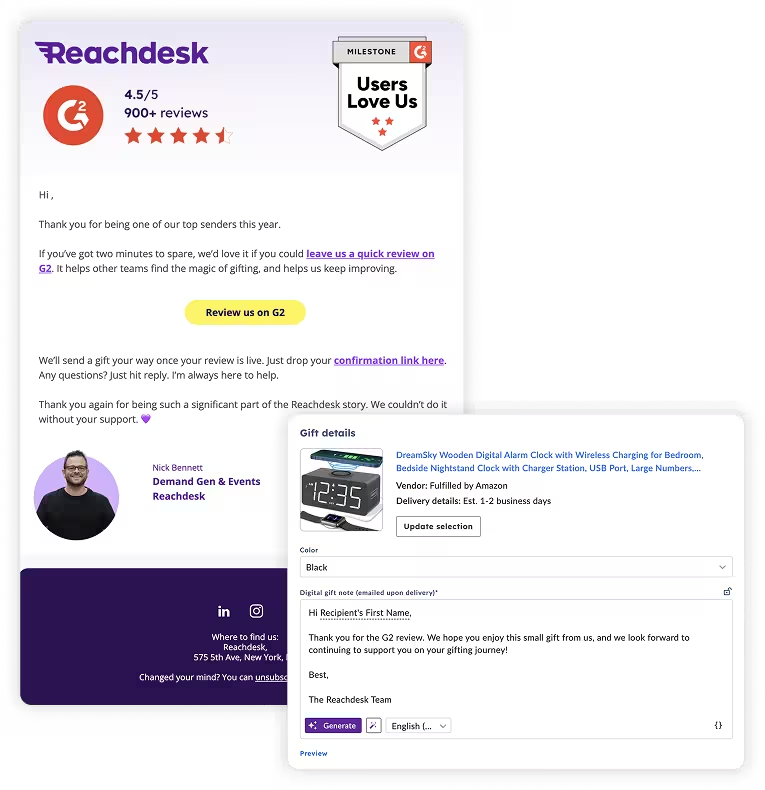
This approach works because it feels human and direct. It does not feel like a marketing campaign.
If you are trying to improve your G2 review conversion rate, authenticity matters more than automation.
Step 3: Collect and verify G2 review submissions
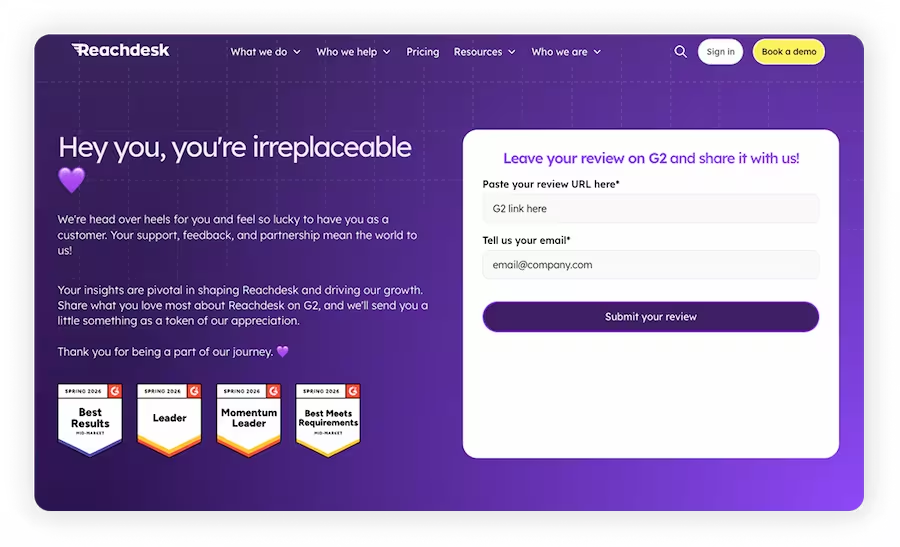
After submitting their review, customers are directed (via the original email) to a HubSpot confirmation landing page, where they provide their details along with their G2 confirmation link.
This step is important for two reasons:
- It verifies that the review was completed
- It creates a direct, human interaction between you and the customer
That reply thread reinforces trust and makes the incentive feel more personal, not transactional.
Step 4: Send a physical gift incentive automatically
Once the review is confirmed, the gift is triggered through Reachdesk.
The customer receives a link to choose a physical gift from a curated marketplace. After selecting their item, it is shipped directly to their door.
This process is fully automated:
- No manual fulfillment
- No operational overhead
- No delays in sending rewards
The automation runs in the background, while the customer experience stays personal and memorable.
Why this G2 review strategy works
This approach combines three key elements:
- Targeting the right customers
- Sending simple, human outreach
- Using physical gift incentives instead of digital rewards
Together, these increase response rates, improve review quality, and help drive more visibility in G2 rankings and AI-powered search results.
G2 review guidelines: How to stay compliant with incentivized reviews
Many teams ask how to run a G2 review campaign while staying within G2’s rules. Here is what you need to know to stay compliant.
Are incentivized G2 reviews allowed?
Yes, G2 allows incentivized reviews, but there are strict guidelines around how incentives are offered.
The most important rule is this:
You must offer the incentive in exchange for an honest review, not a positive review.
You cannot:
- Offer a reward only for 4 or 5 star reviews
- Condition the incentive on positive feedback
The incentive must be unconditional. Every reviewer receives the reward regardless of their rating or comments.
Why our G2 review strategy stays compliant
Our approach with physical gift incentives aligns with G2 guidelines.
The gift is only sent after the review is submitted and confirmed, but it is not tied to the outcome of the review. The customer is free to leave any rating or feedback.
This means you are rewarding participation, not influencing sentiment.
Disclosure requirements for G2 reviews
G2 requires that any incentivized review is disclosed.
During the review process, G2 prompts users to confirm whether they received an incentive. This ensures transparency and helps maintain trust in the platform.
To stay compliant:
- Do not hide or obscure the incentive
- Allow reviewers to disclose it during submission
This protects both your brand and the credibility of your reviews.
Using G2 review campaign tools vs external outreach
G2 offers its own review generation tools with built-in compliance processes. These can be useful, but they are not required.
You can run your own G2 review campaign outside of their platform, as long as you follow the guidelines.
In our case, we used a simple email outreach combined with a physical gift incentive and directed customers to our G2 profile page.
What to avoid in G2 review campaigns
There are a few common mistakes that can put your campaign at risk:
- Sending bulk, highly automated review requests
- Creating sudden spikes in review volume
- Using messaging that feels scripted or transactional
G2 monitors review velocity and patterns. A steady, human outreach cadence over time performs better and reduces the risk of triggering compliance issues.
Key takeaway for G2 review compliance
If you want to scale G2 reviews safely:
- Offer incentives for honest feedback only
- Keep rewards unconditional
- Ensure proper disclosure
- Focus on authentic, human outreach
Following these best practices allows you to increase G2 reviews while maintaining compliance and protecting long-term credibility.
How to set up a G2 review campaign in Reachdesk
If you are a Reachdesk customer and want to increase G2 reviews using this strategy, here is how to set up your campaign step by step.
Step 1: Create your gift campaign in Reachdesk
Start by building a new gifting campaign inside Reachdesk.
Set your budget based on your review incentive. We used a $20 incentive per review. Choose the physical gift marketplace instead of digital gift cards to improve engagement and conversion rates.
You can:
- Curate a selection of gifts that match your brand
- Allow recipients to choose from the full marketplace
Giving recipients choice improves the overall experience and increases the likelihood of review completion.
Step 2: Set up your G2 review trigger
Next, define how and when the gift is sent.
For manual outreach:
- Create a shareable gift link in Reachdesk
- Include the link in your G2 review request email
- The gift is triggered when the recipient claims it
For automated workflows:
- Integrate Reachdesk with your CRM or email platform
- Trigger the gift when a contact submits a G2 review
- Use a confirmation step, such as receiving a G2 review link or manually marking the review as complete
This ensures gifts are only sent after verified review submissions.
Step 3: Automate gift fulfillment and delivery
Once the trigger is activated, Reachdesk handles the rest.
Recipients receive a link to choose their physical gift, enter their shipping details, and complete the redemption process. The gift is then shipped directly to their address.
This process is fully automated:
- No manual fulfillment required
- No operational overhead
- Consistent and scalable delivery
Automation allows you to scale your G2 review campaign without adding workload to your team.
Step 4: Track G2 review performance and gift redemption
To optimize your results, track both gifting and review performance.
Reachdesk provides:
- Gift sends
- Claim rates
- Redemption data
G2 provides:
- Total review volume
- Review quality
- Report and category rankings
Review both data sources together to identify bottlenecks:
- High claim rate but low review volume suggests an issue with your outreach messaging
- High response rate but low gift claims suggests friction in the redemption experience
Tracking both sides helps you continuously improve your G2 review strategy.
How to optimize your G2 review campaign
To get the best results from Reachdesk:
- Use physical gifts instead of digital incentives
- Keep your outreach simple and human
- Verify reviews before triggering gifts
- Monitor both conversion and redemption metrics
This setup makes it easy to scale G2 reviews while maintaining a high-quality customer experience.
Turn G2 reviews into a growth channel
Switching from gift cards to physical gifts was a small operational change. The impact came from how it changed the experience.
When inboxes are full of automated requests, a physical gift delivered to someone’s door stands out. It signals that a real person is behind the ask. That signal matters more than the $20 incentive.
G2 reviews are not just social proof. They are a distribution channel. They power category rankings, influence buying decisions, and now feed AI search results. Every review you generate today increases your visibility tomorrow.
If you are treating your G2 profile as a one-time task, you are missing a scalable source of pipeline.
The strategy is simple. The tools are already in place. The results are proven.
Ready to increase your G2 reviews with impactful gifts?
Talk to a Reachdesk expert and start running this play today.

.avif)