
Event fulfillment tools with integrated reporting combine shipping and inventory management with built-in metrics on claim rate, cost per attendee reached, and pipeline attribution, connected directly to a CRM rather than tracked in a separate spreadsheet after the event ends. Most event ROI tracking fails not because the data doesn't exist, but because it's split across a fulfillment vendor's shipping confirmations, a separate gifting platform's claim data, and a CRM that was never connected to either.
This guide covers what integrated reporting should actually show, why published cost-per-lead benchmarks are less reliable than they look, and what to ask a vendor before you commit to one for your next event cycle.
What does integrated reporting mean for event fulfillment tools?
Integrated reporting means a single platform tracks what was shipped, what was claimed or redeemed by attendees, and how that activity connects to pipeline in your CRM, rather than requiring a manual export-and-merge process after the event. A fulfillment-only tool can confirm a shipment arrived. It can't tell you whether the swag or gift was actually claimed by the intended recipient, or whether that recipient later became a qualified opportunity. Integration is what closes that gap, by pulling shipment, claim, and CRM data into one dashboard instead of three disconnected systems.
Why does event ROI tracking fail without integrated reporting?
Event ROI tracking fails most often because teams can measure spend easily but can't connect that spend to pipeline without manually reconciling data from separate systems, and that reconciliation step is where most programs quietly give up. This is a documented, widespread gap: 94% of marketers say their company fails to convert event leads into opportunities, according to 2025 data from Certain compiled in Wave Connect's 2026 event marketing statistics. Separately, only 34% of businesses have a formal ROI tracking system in place at all, per CEIR research cited by EC Exhibits in 2026.
Without integrated reporting, closing that gap means someone manually matching shipment records, redemption data, and CRM opportunities after the fact, which rarely happens consistently across every event on a calendar.
What metrics should an event fulfillment platform's reporting actually show?
The reporting that actually matters for events goes beyond a shipment confirmation to track claim rate, cost per attendee reached, and pipeline value attributed back to the event, ideally inside the same dashboard used for day-to-day fulfillment. A platform that only confirms delivery is giving you half the picture: it tells you the swag arrived, not whether it did anything once it got there.
Look for reporting that covers each of these:
- Claim or redemption rate: the percentage of intended recipients who actually claimed a gift or swag item, not just how many were shipped
- Cost per attendee reached: total event fulfillment spend divided by attendees who engaged with the offer, giving a comparable figure across different event sizes
- Pipeline attribution: opportunities and pipeline value tied back to the event through CRM integration, not a separate manual tagging process
- Real-time visibility: dashboard access during the event itself, not only a report compiled afterward
How reliable are published cost-per-lead benchmarks for events?
Published cost-per-lead benchmarks for trade shows vary widely, depending on the source, the event type, and how each one defines a qualified lead. That makes any single number a weak substitute for your own measured baseline.
Current sources show how wide that spread is. Wave Connect's 2026 event marketing statistics list an average event cost per lead of $112, citing Exhibit Surveys (2025). EC Exhibits' 2026 trade show ROI guide puts the industry average at $150 to $250 per lead, and $75 to $125 for top performers. Rather than importing one of these figures as a target, measure your own cost per qualified lead across two or three events first. Then use that as your baseline going forward, since event format, industry, and lead-qualification standards all shift the number.
The directional comparison is more useful. A face-to-face contact at a trade show costs about $96, compared to $1,039 for cold outreach to the same person, according to CEIR figures cited in GetBoothIQ's 2026 guide to measuring event ROI. That gap is a more durable planning input than any single dollar figure, which changes year to year and by methodology.
Steps to set up ROI tracking for your next event
Setting up reliable ROI tracking for events is a sequence of decisions made before the event, not a report assembled afterward. The five steps below establish tracking that doesn't depend on manual reconciliation once the event is over.
- Connect your fulfillment or gifting platform to your CRM before the event. Confirm the integration is live and attributing correctly with a test record, not for the first time after real data starts flowing.
- Define what counts as a qualified lead before counting any. Agree this with sales ahead of the event, so the lead count isn't inflated by badge scans that never convert.
- Set a claim rate target for gift and swag offers. Use this to separate who was offered a gift from who actually claimed it and engaged.
- Track pipeline attribution on a 30, 60, and 90-day cadence. B2B sales cycles from event leads commonly extend several months past the event, so a single post-event report can miss much of the pipeline impact.
- Compare cost per qualified lead against your own prior events, not an external benchmark. Use your own historical data as the baseline, given how much published figures vary by source and methodology.
What questions should you ask a vendor about their reporting capabilities?
The right questions about event fulfillment reporting capability surface whether a platform's integration is a real, tested connection or a feature listed on a pricing page that's never been configured for a use case like yours.
Ask these directly during evaluation:
- Which CRMs do you integrate with natively, and is that a live, bidirectional sync or a one-way export?
- Can I see claim or redemption rate by event, not just total units shipped?
- Is reporting available in real time during the event, or only compiled afterward?
- Can pipeline attribution be tracked over a 90-day window, not just at the point of initial lead capture?
Is integrated reporting necessary for every event?
Not always. A single small event with a handful of attendees and no formal lead-qualification process can usually be tracked manually without much pain. Integrated reporting earns its cost once you're running multiple events a year, need to compare performance across them, or have to justify event spend to a budget owner who expects pipeline attribution, not just a shipment confirmation.
Common mistakes when evaluating event reporting tools
Most event reporting failures trace back to assumptions made during vendor evaluation, not problems with the platform itself once it's running. Assuming a listed CRM integration is fully configured out of the box, or treating a published industry benchmark as a target rather than your own baseline, are the two most common ways a reporting setup underdelivers.
Watch for these before they show up as a gap in your first post-event report:
- Assuming a listed integration works out of the box without testing it before the event
- Treating a published cost-per-lead benchmark as a target instead of establishing your own baseline
- Measuring only shipment data, with no visibility into whether gifts or swag were actually claimed
- Running a single post-event report instead of tracking pipeline attribution over 30, 60, and 90 days
How Reachdesk approaches integrated event reporting
Reachdesk helps B2B go-to-market teams turn event gifting and swag into reportable pipeline impact, connecting fulfillment, claim tracking, and CRM reporting into one system so pipeline attribution doesn't depend on manually reconciling shipment data against a separate CRM export after the event.
Insights and CRM-connected reporting
Reachdesk's reporting runs through Reachdesk Insights, which shows how gifting and swag sends influence pipeline growth and close rates. The Salesforce integration tracks every Reachdesk campaign, from triggered campaigns to one-to-one sends, logs activity back to Salesforce, and gives you access to Salesforce's campaign reports. That means a gift or swag send tied to a specific event shows up in the same reports your revenue team already uses, not in a separate spreadsheet. Team wallets with user-level spend limits and real-time tracking sit alongside this, so you can see what each team spends and what results it generates without a separate finance tool.
How Reachdesk manages event swag fulfillment, logistics, and reporting
For event teams, managing swag is only part of the job. Sourcing, shipping, returns, attendee redemption, and reporting all need to work together.
With Reachdesk event fulfillment, you can ship swag and event materials to any event with ground or express shipping, backed by a 5-day domestic shipping SLA. When you opt in for returns, each shipment includes a pre-paid return label, and Reachdesk counts, restocks, and stores leftover items for your next event. Reachdesk Creative Services can create personalized landing pages and curated gift bundles for individual events, while Store Portals give attendees or employees a self-serve way to choose their own swag before, during, or after an event.
That flexibility extends to sourcing. Teams can use Swag Sourcing for bulk orders at discounted pricing when quantities are predictable and there's enough production lead time, or order on demand with no minimum quantities when numbers are smaller or harder to predict.
Track event swag performance, pipeline, and ROI in Reachdesk Insights
Because swag sourcing, warehousing, Store Portal redemptions, gifting, and event logistics are managed through Reachdesk, teams can connect activity back to the same reporting layer instead of piecing together data from separate logistics, creative, and storefront providers.
Workhuman shows what that looks like at scale. Using Reachdesk budget management, user wallets, and performance dashboards, Workhuman can monitor campaign performance and ROI without waiting until an event is over to reconcile results (Reachdesk customer data, 2026).
For its 'Fuel Your Focus' campaign after the Workhuman Live HR Conference 2024, the team sent 100 personalized gift boxes to re-engage attendees. The boxes generated 95 responses from contacts in its ideal customer profile and 34 booked meetings. The campaign influenced one opportunity and progressed 14 more. Across three corporate gifting campaigns in 12 months, Workhuman generated more than $10 million in influenced pipeline and more than $70 million in opportunity progression, according to its Reachdesk case study.

Connect event gifting and swag data to Salesforce
Event and swag activity can also become part of the wider GTM reporting process rather than living in an event-specific spreadsheet.
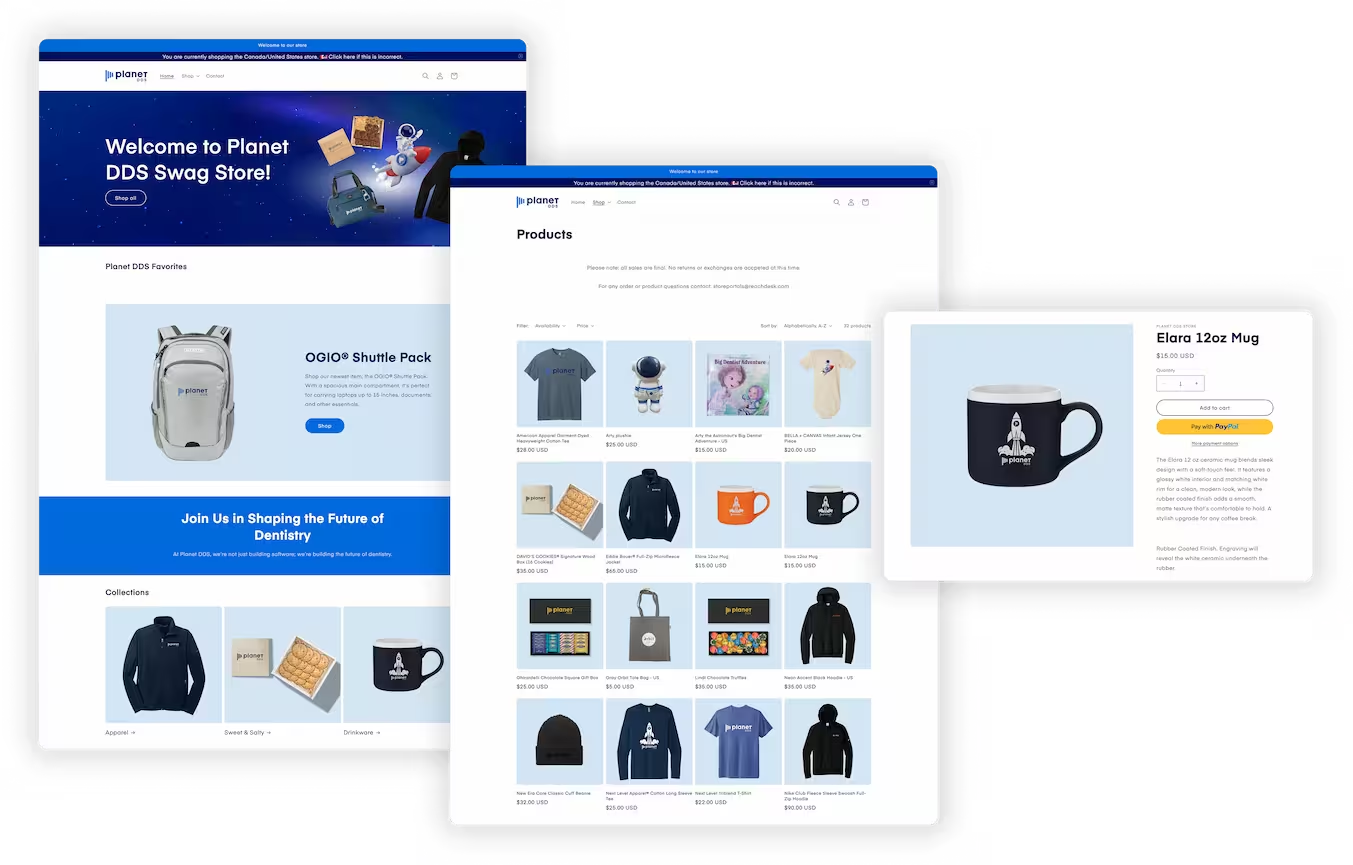
Planet DDS, for example, tracks gifting and event activity via Reachdesk through Salesforce. In its first six months using Reachdesk, the team generated 20 opportunities, nearly 7x influenced pipeline ROI, and a 93% gift claim rate (Reachdesk customer data, 2026).
Planet DDS also runs a self-serve Store Portal for customers and prospects. At events, sales reps give high-value contacts a Zenith Card worth $80 in store credit, so those redemptions sit alongside the rest of its gifting activity. After its annual customer summit, Orbit, the team sent leftover event swag straight from the Reachdesk warehouse to customers who missed the event, giving that swag a second life (Reachdesk customer data, 2026).

Together, these capabilities give teams one connected view of event swag, gifting activity, engagement, pipeline influence, and ROI, making it easier to understand what happened after the boxes arrived and which experiences actually contributed to revenue.
FAQ: Event fulfillment reporting and ROI tracking
What's the difference between fulfillment tracking and ROI reporting?
Fulfillment tracking confirms shipments were sent and arrived. ROI reporting goes further, showing whether recipients claimed or redeemed what they were offered and whether that activity connects to pipeline in your CRM. A platform can have strong fulfillment tracking and still lack real ROI reporting if the two aren't connected.
How long should I wait before measuring event ROI?
Plan for a 30, 60, and 90-day measurement window rather than a single post-event report, since B2B sales cycles from event leads commonly extend several months. An early report will understate true pipeline impact if it only looks at the first few days after the event.
Should I use published cost-per-lead benchmarks to set targets?
Treat published benchmarks as a rough reference point rather than a target, since figures vary significantly by source, event type, and qualification criteria. Your own cost per qualified lead across two or three past events is a more reliable baseline than any external figure.
What does claim rate measure?
Claim rate measures how many recipients who were offered a gift actually claimed it, not how many items were shipped. With claim-based gifting, a gift ships only after the recipient accepts it and confirms where to send it, so nothing is produced or shipped for someone who never responds. A low claim rate points to a problem with the offer, the list, or the personalization before any fulfillment cost is incurred. That's why it's worth tracking as its own metric, rather than assuming a high shipment count means the program is working.
Ready to connect your event fulfillment to real pipeline data?
Whether you're running one flagship event or a packed global calendar, Reachdesk connects event fulfillment, claim tracking, and CRM reporting in one place, so your next event report doesn't start with a manual data reconciliation.
Book a demo to see how Reachdesk helps marketing and events teams track event ROI without stitching together data from separate systems.