

A branded swag storefront is a self-service online shop, built with your company's logo and colors, where employees browse a curated catalog and order items like polos, T-shirts, and backpacks on their own, without submitting a request to HR or marketing.
This is different from swag sourcing, which is the upstream process of selecting, producing, and procuring the physical items themselves, from vendor selection through quality control, before anything reaches a storefront or a one-off shipment.
A swag storefront is what employees see and use. Sourcing is what makes sure the right items are available to stock it. Together, they cover the full lifecycle: choosing what to sell, then giving employees an easy way to get it. This guide covers both, starting with what a storefront actually is, then moving through the concrete steps to launch one, stock it, and keep it running without over-ordering.
What is a branded swag storefront?
A branded swag storefront is a dedicated, company-branded online store where employees, and sometimes customers or event attendees, select and order specific merchandise items themselves. Unlike a one-off swag request, which routes through an admin who sources, personalizes, and ships each item individually, a storefront runs as a standing catalog that stays open and current. Employees pick their own size, color, and item, and the order routes automatically to fulfillment.
The storefront sits apart from a general swag closet or spreadsheet because it is employee-facing and always available, rather than internally managed one request at a time. Most swag storefronts run on one of three transaction models: reward, where employees redeem points for items at no direct cost; payment, where employees pay directly, often at a subsidized rate; or hybrid, a mix of both. Choosing a model early shapes catalog size, budget controls, and reporting for everything that follows.
Why give employees a self-service store instead of one-off requests?
A self-service swag store removes the bottleneck that forms when every swag request routes through a single person or team. Instead of an admin fielding size questions, address confirmations, and reorder requests one at a time, employees complete all three steps themselves in a few clicks.
This matters more as headcount grows or teams spread across regions, because manual fulfillment does not scale at the same rate as the requests coming in. It also reduces the risk of employees ordering swag independently through unapproved vendors, which fragments both budget tracking and brand consistency across a program. There's a brand case for this too, not just an operational one, and recent consumer research backs it up with real numbers rather than assumptions.
Recent studies give a clear picture of why the item itself still matters, even in a self-service model:
- 38% of consumers say they still remember the brand behind a promotional item months or even years after receiving it, according to PPAI Research's 2025 consumer study.
- Nearly two-thirds of consumers say they're very likely to keep a branded product for six months or longer, and almost three-quarters associate branded merchandise with positive emotions such as pride or belonging, per PPAI's Product Power 2026 study of more than 5,000 U.S. respondents.
- A typical promotional product generates about 3,300 brand impressions over its lifetime at a cost per impression of less than $0.001, based on ASI's Global Ad Impressions research as compiled in PPAI-industry data on promotional product performance.
What items should you stock for employee self-service ordering?
The strongest employee swag storefronts stock a mix of everyday wearables and a few higher-value items, rather than a single T-shirt design in one size. Apparel drives the bulk of engagement because employees wear it repeatedly, but the catalog should still include enough variety that people actually want to redeem their allotment instead of letting it sit unused. Keep the initial catalog to a manageable size rather than trying to stock everything at once. A smaller, well-curated selection is easier for employees to browse and easier for your team to keep in stock, and you can always expand it once you see which items redeem fastest.
A well-rounded starting catalog typically includes:
- Core apparel: polos, T-shirts, hoodies, and outerwear, offered in a full size range including extended sizes
- Bags and travel items: backpacks, tote bags, and laptop sleeves
- Everyday tech: wireless chargers, laptop stickers, and webcam covers
- Drinkware: insulated water bottles and travel mugs
- Onboarding-specific items: a welcome kit bundle for new hires, separate from the general catalog
Steps to launch your employee swag storefront
Launching a swag storefront is a sequence of decisions made in order, not a single setup task. Getting the sequence right up front, model first and catalog second, budget caps before launch rather than after, saves you from rebuilding the store once real usage patterns show up. The six steps below cover what a marketer or HR program owner needs to do before employees ever see the store.
- Choose your transaction model. Decide whether the store runs on reward (points), payment (direct pay), or hybrid, since this determines how checkout, budgeting, and reporting are configured.
- Curate your initial catalog. Start with 15 to 25 items across apparel, bags, tech, and drinkware rather than launching with your full product range.
- Set budget and order caps. Define a per-employee redemption limit, whether that's a points allotment or a dollar cap per quarter or year, before the store goes live.
- Configure access and branding. Connect the store to your employee directory or single sign-on, and apply your logo, colors, and welcome messaging.
- Launch to a pilot group first. Roll the store out to one team or region for two to four weeks before opening it company-wide, so you can catch sizing or shipping issues early.
- Review redemption data and refine quarterly. Use early data to adjust the catalog, tighten or loosen budget caps, and retire items that aren't redeeming.
How does employee ordering and fulfillment work once the store is live?
Once the swag storefront launches, the process runs the same way for every order: an employee logs in, selects an item, and the platform handles fulfillment without your team touching the order manually. The steps below outline what happens from an employee's login to delivery at their door.
- Employee logs into the branded store portal using a company email or single sign-on, so access stays limited to current employees.
- Employee browses the catalog and selects an item, choosing size, color, and any personalization options available.
- Employee checks out using whichever model the store is configured for: redeeming points, paying directly, or a hybrid of both.
- Order routes automatically to fulfillment, either shipping from stocked inventory at a regional warehouse or triggering on-demand production if the item isn't pre-stocked.
- Item ships directly to the employee, with tracking provided through the same portal they ordered from.
- Order and spend data feed back into reporting, so admins can see redemption rates, popular items, and total spend without pulling data from a separate system.
The biggest variable here is whether items ship from existing regional inventory or are produced on demand per order. Regional warehousing is faster for high-demand basics like T-shirts and polos, while on-demand production works better for lower-volume or highly personalized items where holding inventory would tie up budget unnecessarily.
How do you set budget guardrails for an employee swag store?
Budget guardrails exist to stop a self-service perk from turning into an uncapped spend line, and they need to be in place before launch, not added after the first quarter's invoice arrives. The most reliable guardrail is a per-employee redemption limit set as either a points allotment or a dollar value per quarter or year, since this caps total exposure regardless of how many employees participate. Beyond that limit, review actual spend against budget monthly during the first quarter after launch, then move to quarterly reviews once ordering patterns stabilize.
A few additional controls worth setting from day one:
- Cap the dollar value or points allotment per employee per period, not just per order
- Set role- or team-level budgets if different departments should have different allotments
- Flag any single order above a set threshold for manual review, rather than approving every order automatically
- Build a hard stop into the platform once an employee reaches their allotment, rather than relying on manual tracking
How do you manage inventory so you don't overorder?
Inventory management for a swag storefront comes down to matching your fulfillment model to each item's actual demand, rather than bulk-ordering everything up front and hoping it sells through. Overordering ties up cash in stock that may never move, while underordering creates stockouts that frustrate employees and generate support tickets. The fix is using the right fulfillment model for each item's popularity, not applying the same approach to your whole catalog.
Practical controls to put in place before launch:
- Use on-demand or print-on-demand production for lower-volume or highly personalized items, so you're not holding inventory that might not sell through
- Reserve bulk, pre-stocked inventory for your highest-demand basics only, where reorder frequency justifies holding stock
- Set low-stock alerts on any item you do hold in inventory, so restocking happens before an item goes fully out of catalog
- Track sell-through rate by item monthly for the first quarter, then adjust which items move to on-demand versus bulk stock
How do you measure employee adoption of a swag store?
Adoption is the first signal to check after launch, because a well-stocked catalog that nobody uses means something in the access, communication, or item selection isn't working. Redemption rate, meaning the percentage of eligible employees who've placed at least one order, is the clearest single number to track, and it's worth reviewing monthly for the first quarter to catch access or awareness issues early rather than months into the program.
Metrics worth tracking from day one:
- Redemption rate: the percentage of eligible employees who have placed at least one order
- Repeat usage: how many employees return for a second order within a set period, which signals the catalog is meeting real demand rather than being used once out of curiosity
- Time to first order: how long after access is granted an employee places their first order, which flags onboarding or communication gaps
How do you measure ROI from an employee swag store?
ROI on an employee swag storefront ties back to whatever outcome the program was built to support, whether that's onboarding experience, recognition, retention, or general brand consistency, so the right metric depends on the program's original goal. Cost per employee engaged, meaning total program spend divided by unique employees who redeemed, is the most useful cross-program number because it makes budget conversations with finance more concrete than a raw spend total.
Additional ROI signals worth tracking:
- Cost per employee engaged: total program spend divided by unique employees who redeemed
- Most and least redeemed items: useful for refining the catalog every quarter rather than guessing at what to add or remove
- Support tickets related to swag ordering: a proxy for whether the self-service experience is actually removing admin burden, or just moving it elsewhere
If a storefront rolls up into a broader gifting or engagement platform, this data can also connect to downstream outcomes like new-hire satisfaction scores or event attendance, rather than sitting in an isolated spreadsheet.
Common mistakes to avoid when launching an employee swag storefront
The most common storefront failures come from process gaps that show up after launch, not from how the catalog looks on day one. Skipping budget caps, launching with too broad a catalog, or treating the store as a one-time project rather than an ongoing program are the issues that turn into recurring support tickets a few months in.
Watch for these before they become a pattern:
- Launching with too large a catalog, which makes browsing harder and stretches inventory budget across items with little proven demand
- Skipping size and fit guidance, which drives up exchange requests and return shipping costs
- No spend or order caps, which can turn an employee perk into an uncapped budget line
- Treating the swag storefront as a one-time project instead of reviewing redemption data and refreshing the catalog on a regular cadence
- Running the store on a completely separate system from other gifting or engagement programs, which fragments reporting and makes total program spend hard to see in one place
How Reachdesk approaches employee swag storefronts
Reachdesk, a revenue enablement and gifting platform, offers Store Portals, which are branded, self-serve swag storefronts that connect directly to Reachdesk's swag sourcing, global fulfillment network, and reporting, so storefront orders show up in the same place as the rest of a company's gifting and engagement data rather than sitting in a separate system. Item selection runs through Reachdesk's marketplace and sourcing network, which includes more than 8,500 gift and swag options (Reachdesk platform data, 2026), with both pre-stocked bulk inventory and on-demand production available depending on the item. Orders ship through Reachdesk's regional warehouses in the United States, Canada, the United Kingdom, Europe, and Australia, with international delivery to more than 180 countries (Reachdesk platform data, 2026), so a distributed workforce doesn't need separate storefronts or vendors per region.
Reachdesk’s Store Portal transaction models
Reachdesk's Store Portals support the three transaction models covered earlier, so you can match the store's economics to your program's goals instead of forcing every audience through one checkout flow.
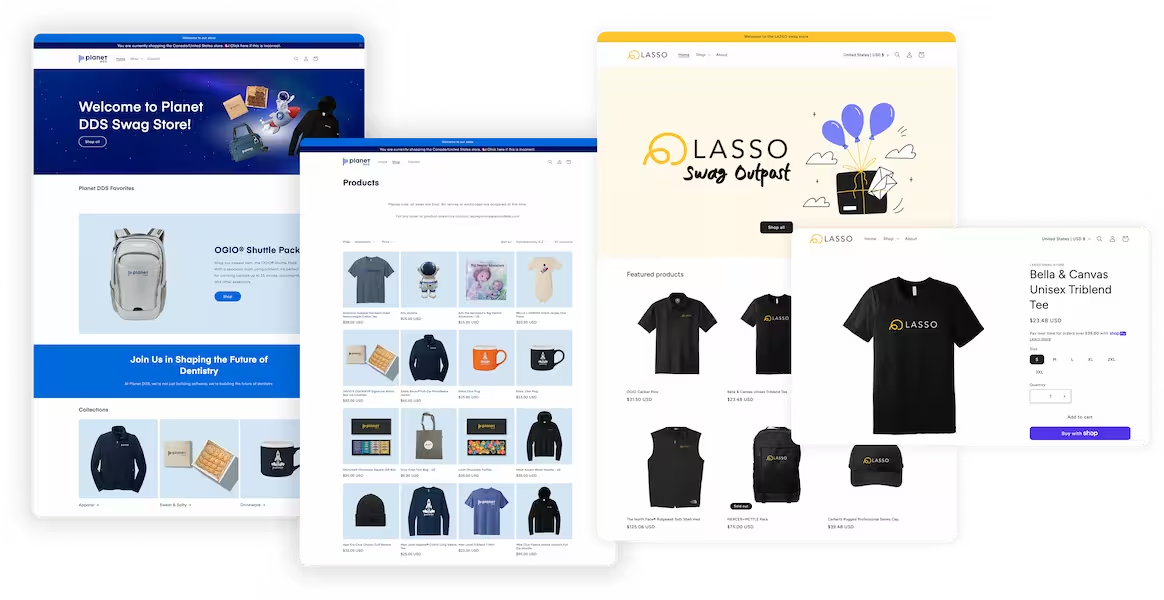
Reachdesk's customers like LASSO and Planet DDS put this into practice with employee and event swag storefronts run from the same platform. LASSO replaced manual swag logistics, which previously meant FedEx runs and boxes of inventory stored in employees' homes, with a self-serve Store Portal for new-hire welcome gifts and internal competition rewards. Their gift claim rate reached 77% in year one and climbed to more than 80% through the first five months of year two (Reachdesk customer data, 2026). Planet DDS runs tiered gift cards for high-value event contacts and seasonal employee storefront credits, seeing close to 7 times pipeline ROI and a 93% gift claim rate across its store and gifting programs (Reachdesk customer data, 2026).
FAQ: Employee swag storefronts
What's the difference between a swag storefront and a one-off swag request?
A swag storefront is a standing, self-service catalog that stays open so employees can order anytime, while a one-off request routes through an admin who sources and ships each item individually. Storefronts work best for ongoing needs like onboarding or always-on perks. One-off requests still make sense for a single timed gift, such as a work anniversary.
How long does it take to launch a branded employee swag storefront?
A single-audience store built on an existing catalog can launch in two to four weeks. A multi-audience store serving employees, customers, and events, with custom branding and approval workflows, typically takes four to six weeks, depending on how much design and catalog curation the team needs before going live.
Do employees pay for swag, or is it free?
It depends on the transaction model. Reward-model stores let employees redeem points at no direct cost, payment-model stores require employees to pay (often at a subsidized rate), and hybrid stores combine both, such as a free annual allotment plus optional paid upgrades.
Can one storefront serve employees, customers, and event attendees?
Yes, provided the platform allows separate catalogs, branding, and budgets for each audience rather than forcing everyone through one generic store. Running them separately, even within a single account, keeps reporting clean by audience and program instead of blending employee perks with customer or event spend.
Ready to launch a branded swag storefront your employees will actually use?
Whether you're replacing manual swag requests, consolidating vendors, or building your first employee storefront from scratch, Reachdesk gives you swag sourcing, branded Store Portals, global fulfillment, and reporting in one place.
Book a demo to see how Reachdesk helps marketing, sales, customer success, and people teams manage employee swag at scale from a single platform.

.avif)