
You already have the signals you need. A deal moves to Closed Won in Salesforce. A prospect shares a personal detail on a call. A customer renewal is coming up. And there’s a gifting campaign that could make each moment count.
The challenge is that those details are scattered across your tech stack. Bringing together the right context, timing, campaign, and message takes time. By the time you connect the dots, the moment has already passed.
The same thing happens when it’s time to measure the impact. Your VP wants to know which gifts influenced pipeline and which campaigns deserve more budget. The answers are there, but they’re split between your gifting platform and CRM. Getting them into one view can mean an afternoon of exports and spreadsheets.
Both challenges come down to connecting the data you already have, when you need it. Reachdesk MCP brings gifting data into the AI assistant your team already uses, alongside context from your other tools. You can ask it to spot an opportunity and prepare a personalized send, then ask a follow-up question to see how that campaign performed.
What is Reachdesk MCP?
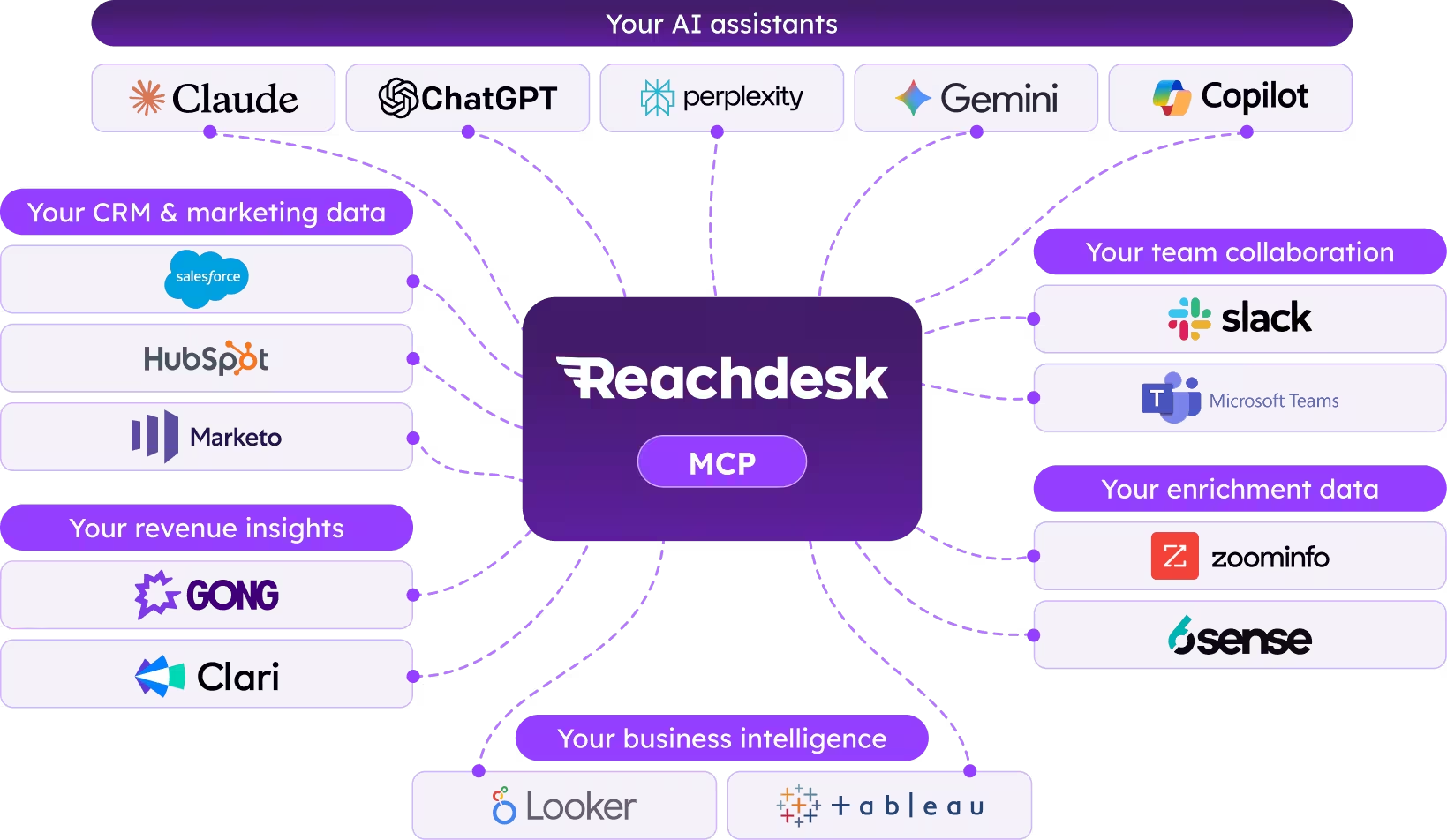
MCP stands for Model Context Protocol, an open standard that lets AI assistants securely connect to the tools you already use. Instead of an AI assistant only knowing what you type into it, MCP lets it read live data from connected platforms and, when you ask it to, take action inside them.
Reachdesk MCP applies that same idea to gifting, and it does it on both fronts. Ask it to act, and it can search your available campaigns, the Reachdesk Marketplace, or the Amazon catalog, then prepare a personalized send for your approval. Ask it to explain, and it can pull your sends, spend, and adoption data into a clear answer, or connect that data to your CRM to show which gifts are actually tied to revenue. It only works within the permissions your Reachdesk role already grants you, and it never sends a gift without your explicit confirmation.
Where it gets genuinely useful is when you pair it with the other MCP-enabled tools already sitting in your GTM stack. A CRM tells your assistant who to gift today, and later, whether that opportunity actually closed, which is exactly the link needed to calculate ROI. A call intelligence tool tells it what a prospect actually cares about, and at scale, which themes across your calls are correlating with the gifts that convert. An intent platform tells it when an account is heating up, and over time, whether accounts that got a well-timed gift moved faster than ones that didn't. Reachdesk MCP takes all of that and turns it into two things at once: a physical, personalized gift when the moment calls for one, and a clear, provable answer on how well the strategy behind it is actually working, without anyone opening a new tab to do either.
From GTM signals to corporate gifting: Putting AI insights into action
Over the last few years, AI agents have earned a real place in the GTM stack. They research accounts, draft sequences, summarize calls, and tell reps who to call next. What almost none of them could do, until recently, was put something physical into someone's hands, or tell you afterward whether doing so actually paid off.
That's really two capabilities in one. The first is action: knowing when a moment calls for a gift and getting the right one out the door. The second is intelligence: understanding, in hard numbers, what your gifting program is actually delivering. Most tools have only ever offered one or the other. A gifting platform can tell you what was sent. A CRM can tell you what closed. Neither has been able to sit inside the same conversation and tell you how the two connect. Reachdesk MCP is what happens when both halves of that job move into one assistant.
Solving two corporate gifting challenges: acting on the right signals and proving what worked
Ask most GTM teams what slows their gifting programs down, and it’s rarely a lack of ideas. It’s answering two questions: What’s the right action to take now? And how do we know it worked?
1. How do you turn scattered signals into the right gifting action?
The information you need is already there, but it lives in different places. Your CRM shows which deals have closed and which accounts are active. Call notes reveal priorities, milestones, and personal details. Reachdesk holds your campaigns, budgets, and sending rules. Bringing those signals together to decide who to gift, what to send, and what to say takes time.
A prospect might share something personal on a call, or an account might show renewed interest. If nobody connects that signal with the account context and an appropriate campaign, the opportunity to follow up with a relevant gift can slip by.
2. How do you measure corporate gifting ROI?
This is the question that tends to get answered the least often, simply because it's the most manual to investigate. Proving gifting ROI means matching a send to a contact, matching that contact to an opportunity, and matching that opportunity to a closed deal, usually across two systems that were never built to talk to each other.
Without that link, gifting spend gets judged on gut feel: which gifts felt like they landed well, rather than which ones actually correlated with pipeline or revenue. Budget conversations become harder to win because the case for more spend is anecdotal instead of provable. And because reporting takes so long to pull together, most teams only look at performance in hindsight, once a quarter, rather than course-correcting in the moment.
Here's what that friction actually costs a team, task by task, across both sides of the problem.
Both challenges come down to connecting the right data: first to decide what action to take, then to understand its impact. Reachdesk MCP brings gifting into the AI assistant your team already uses, so you can move from scattered signals to a prepared send and from campaign results to answers you can act on.
From AI prompt to doorstep: How Reachdesk MCP works
Getting value from Reachdesk MCP comes down to four steps.
- Connect Reachdesk to your AI tool. Set it up once in Claude, ChatGPT, or any other MCP-enabled assistant your team relies on. It takes a few minutes, and the same connection works across your whole team once it's configured.
- Connect the rest of your GTM stack too. Reachdesk MCP is built to work alongside your other tools, not instead of them. Connecting your CRM, call intelligence platform, intent tool, or messaging app to the same assistant means information flows freely between all of them, so your assistant isn't just looking at gifting data in isolation. The more of your stack that's connected, the sharper every recommendation and every report becomes, and it's a one-time setup per tool, not something you repeat for every request.
- Ask in plain language. Instead of navigating a dashboard, you describe what you need, whether that's a send to prepare or a question about performance. Something like: "Show me the opportunities that moved to Closed Won this week. Recommend a welcome gift for each and prepare the sends for my approval." Or: "Show me our gifting ROI for the last two months." Your assistant does the digging, whether that means matching a moment to an eligible campaign or matching a send to a closed deal, and puts together an answer.
- Preview, then send. This is the part that matters most for staying in control on the action side. Every gift send is a two-step process. Your assistant shows you exactly what it's about to do, the recipient, the gift, and the cost, and waits for your explicit confirmation before anything goes out. Nothing is ever sent automatically, and an eligible send can still be cancelled within the platform's cancellation window if plans change.
Every send is previewed and requires explicit confirmation, while your existing Reachdesk permissions determine exactly what your assistant can access and do.
How Reachdesk MCP keeps every AI-powered gift secure and in your control
None of this works if it comes at the cost of oversight, which is why control is built into every layer of Reachdesk MCP. Your existing permissions carry over exactly as they are. Every send goes through a preview and requires your explicit confirmation before anything happens. Eligible sends can be cancelled within the platform's cancellation window, whether that's done through your assistant or directly inside Reachdesk. And your admin decides how each individual tool behaves, whether it runs automatically, asks first, or is switched off entirely, from the connector's tool permissions screen.
The goal isn't to remove people from the gifting decision, or to replace judgment with automation on the reporting side either. It's to remove the busywork that used to stand between a good idea and a completed send, and between a good result and a provable one, so your team spends its time on the parts that actually require judgment.
How marketing, sales, and customer success teams use AI gifting
The clearest way to understand what Reachdesk MCP changes is to look at how it plays out across a normal week for three different teams, both in the moments they act and the moments they need to prove it worked.
1. Marketing: Optimize campaigns and prove gifting ROI
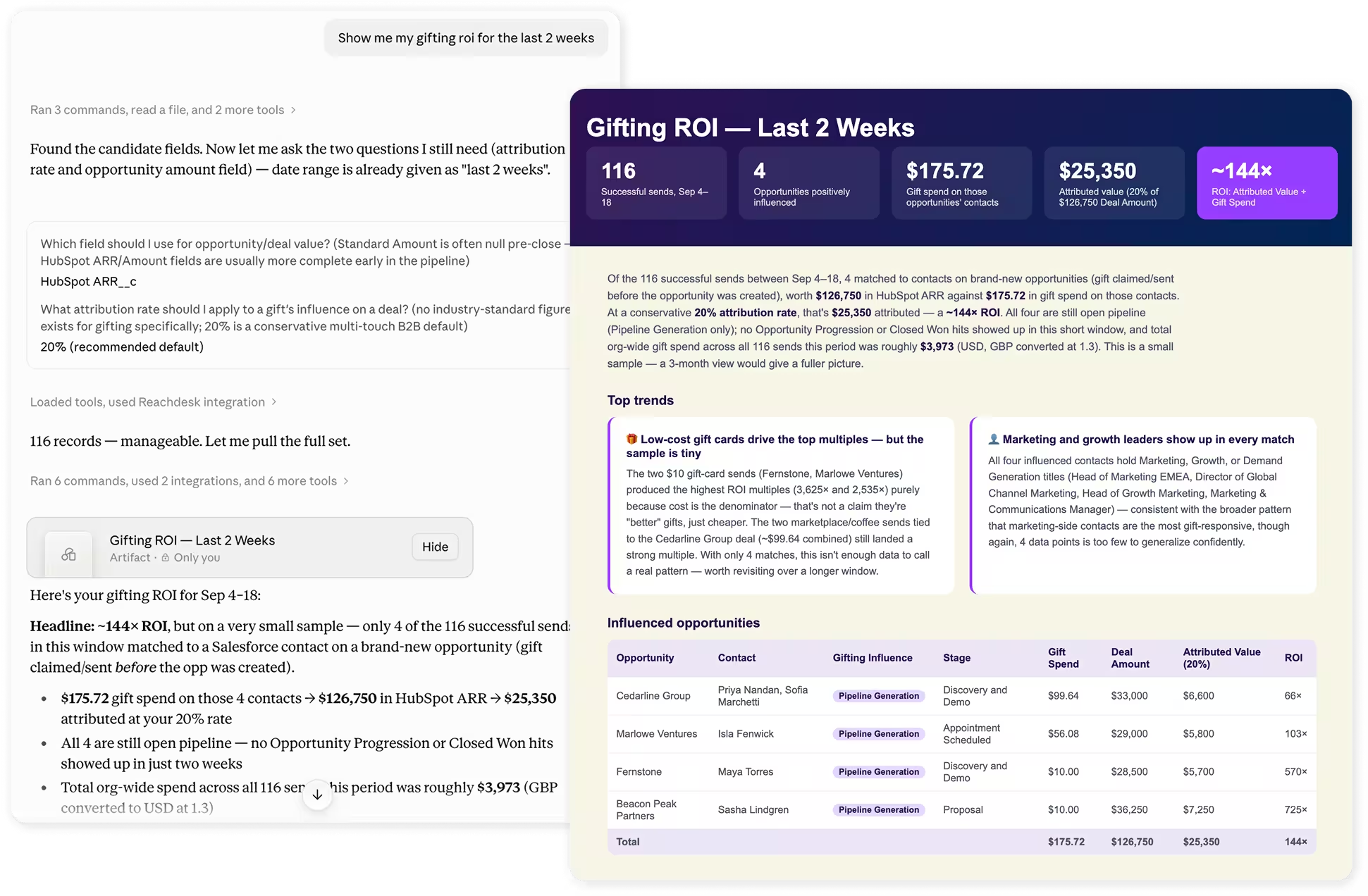
Marketing teams are judged first and foremost on one question: what's actually working? Instead of building a report from scratch, a marketer can just ask.
"Show my gift spend, top-performing gifts, and adoption trends by region for the last quarter."
The assistant pulls every send from the period, breaks down spend by region and campaign, and highlights which gifts are driving the most engagement, all in one pass. Ask a follow-up question and it reshapes the view instantly, no rebuilding required.
That same view becomes the starting point for the next gifting campaign, rather than a report that gets filed away. Instead of building a new campaign on instinct, a marketer can ask their assistant to point them toward what's already proven itself:
"Which gifts had the highest adoption and engagement last quarter, and which regions should we prioritize for the next campaign?"
The assistant surfaces the patterns, the gift types that consistently land, the regions where budget is working hardest, the campaigns worth scaling, and the ones quietly underperforming. That turns campaign planning into a decision grounded in what's already worked, rather than a guess dressed up as a plan.
The same setup works just as well for staying ahead of a problem instead of discovering it after the fact. Connect Reachdesk MCP to a messaging tool like Slack, and a marketer can ask their assistant to flag any team approaching its limit:
"My quarterly budget for each team is $250. Message me if any team is over budget or within 80% of it."
The assistant checks spend against the budget, accounts for how much of the quarter is left, and sends the alert while there's still time to act, not after the invoice lands.
2. Sales: Find the right moment and gift for every prospect
For sales reps, the challenge isn't wanting to send a thoughtful gift. It's finding the time to connect a CRM update, a call transcript, and a catalog search into one coherent decision.
Connect Reachdesk MCP to your CRM and a rep can ask:
"Show me the opportunities that moved to Closed Won this month. Recommend a welcome gift for each and prepare the sends for my approval."
The assistant identifies the accounts, pulls the relevant contact details, matches a gift to the moment, and lays out every send for review, turning what used to be a half-day task into a two-minute check.
Pair it with a call intelligence tool and the personalization goes a level deeper.
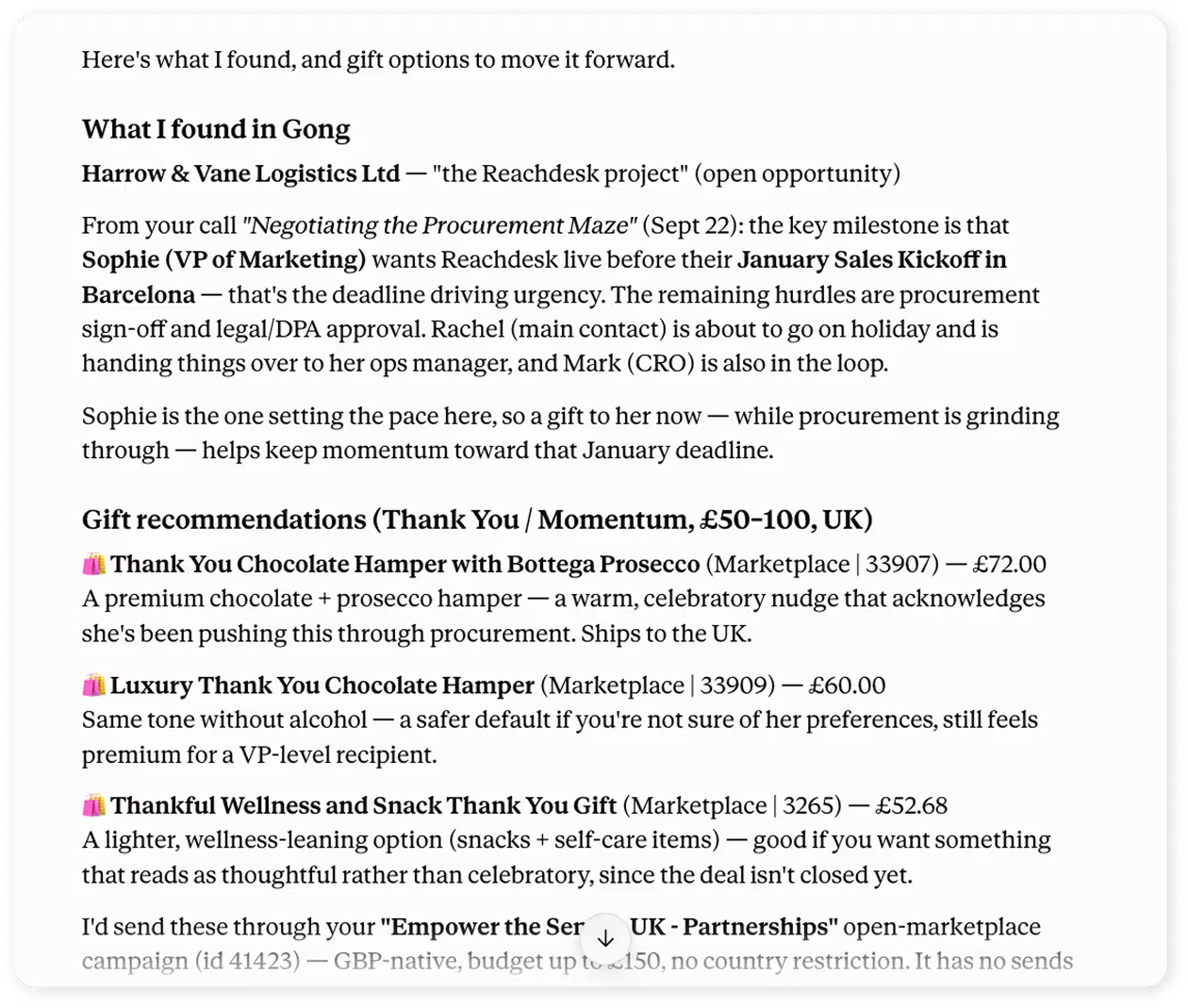
"Review my recent calls and find open opportunities where the prospect mentioned an upcoming priority or milestone. Recommend a gift for the top three and prepare the sends for my approval."
Instead of relying on memory or scattered notes, the assistant surfaces the moments that actually matter and prepares a send that reflects something the prospect genuinely cares about, not just their job title. Connect a calendar tool as well, and timing gets even sharper: the assistant can check whether a prospect has an upcoming demo, renewal discussion, or contract deadline on the books, so a gift lands a day or two ahead of the meeting instead of getting sent on a random Tuesday with no reason behind the timing.
And because timing so often makes or breaks a gift's impact, connecting an outbound or sequencing tool means the moment that gift is delivered, the next step in the cadence fires automatically, so the rep is already in motion instead of waiting on a manual check.
3. Customer success: Automate gifts for renewals and milestones
Customer success teams manage relationships that span months or years, which makes timing especially important. A renewal gift that arrives too late, or a milestone that goes unmarked, is a missed opportunity to reinforce the relationship.
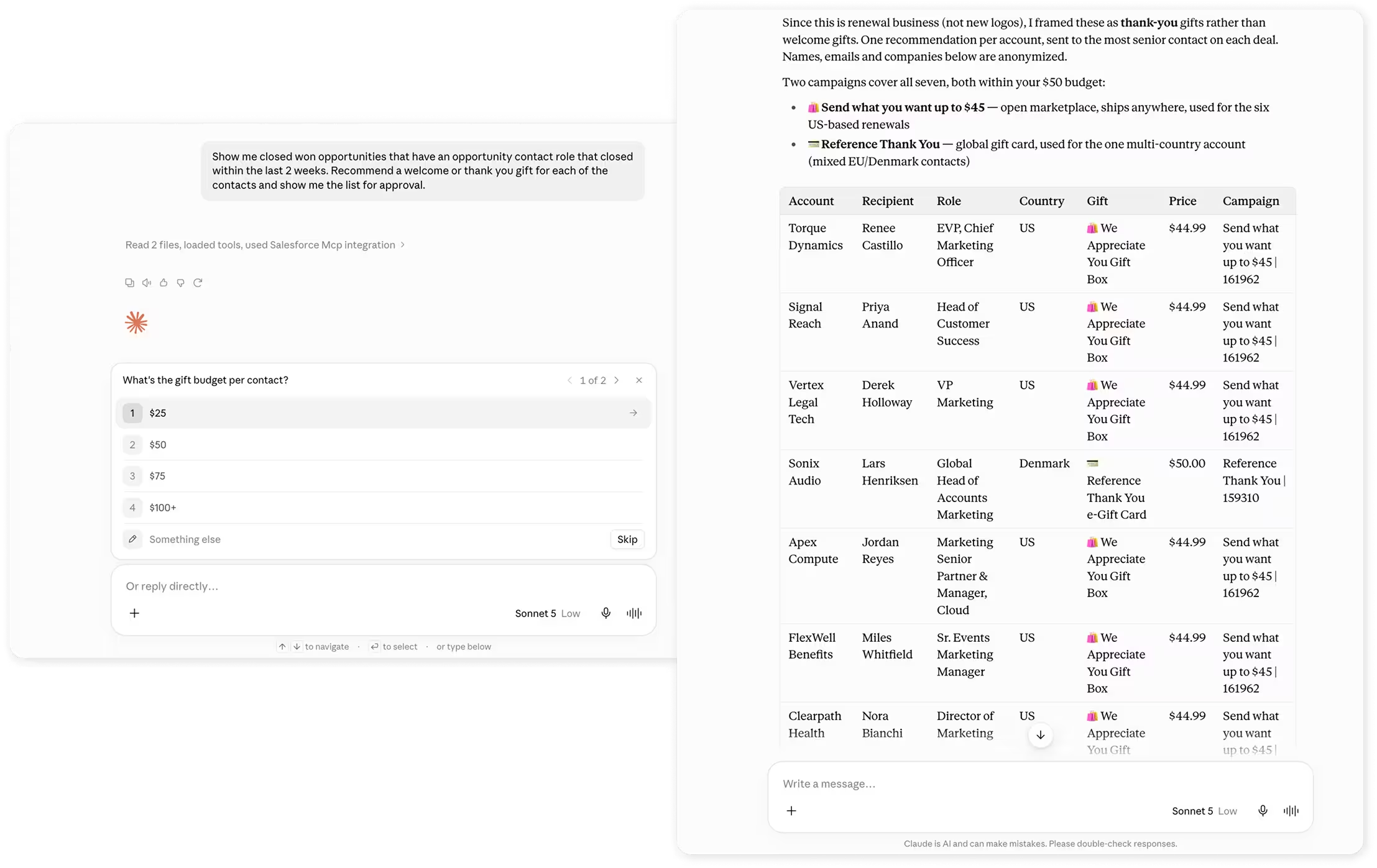
"Show me accounts renewing in the next 30 days and recommend a gift for each based on their usage and engagement history."
The assistant uses the relationship, engagement history, upcoming moments, and goal of the outreach to recommend a relevant gift and approach for each customer or prospect. If you connect a calendar tool, it can also factor in a QBR or kickoff call, helping you prepare a thoughtful touchpoint ahead of the conversation.
The same workflow catches the milestones that tend to slip through the cracks.
"Find any customers hitting their one-year anniversary with us this month and prepare a thank-you gift for each."
What used to require a manual calendar check and a separate trip into the gifting dashboard now happens as part of the same conversation a CSM is already having about their book of business.
A gifting MCP built to grow with your tech stack
The pattern across all three teams is the same, on both sides of the equation. Reachdesk MCP supplies the gift, the fulfillment, and the performance data. Whatever else is connected supplies the context about who to gift, why, when, and how to measure what happened next.
Because Reachdesk MCP is built on the open MCP standard, it isn't limited to a fixed list of partners. It works with any MCP-enabled tool your team adopts next, so the value only compounds as your stack grows.
None of these connections are required to get value from Reachdesk MCP on its own. But each one you add gives your assistant one more piece of the picture, whether that's a better recommendation for what to send or a clearer answer on what it delivered.
How to get started with Reachdesk MCP
Reachdesk MCP is available through early access for current customers, with setup that takes about three minutes once you have your MCP URL from your Reachdesk admin. From there, you connect it to Claude, ChatGPT, or your MCP-enabled assistant of choice, set your tool permissions, and you're ready to turn your first signal into a send, and your next report into an answer.
Gifting has always worked best when it's timely, personal, and backed by proof that it's paying off. Reachdesk MCP doesn't change what makes a gift effective. It just removes everything that used to get in the way of sending it, and everything that used to get in the way of proving it.
Ready to see it in action? Apply for early access or book a demo to walk through it with your team.